
How to Write Stories Online for Kids: The Complete Parent's Guide
This guide walks you through everything you need to know about creating personalized stories online for children ages 3-12.
The Moment Every Parent Recognizes
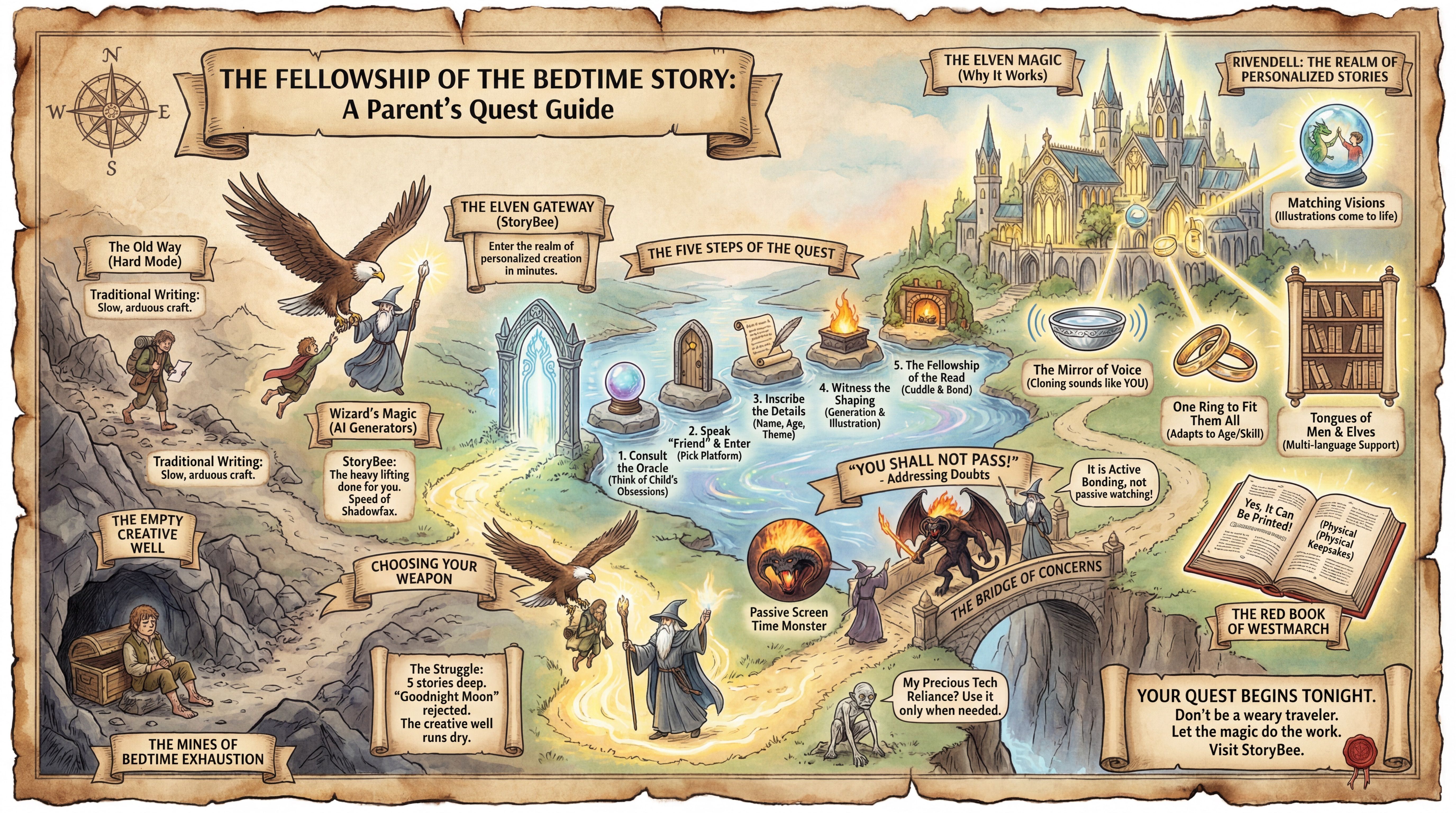
You are five stories deep into bedtime. Your child has rejected Goodnight Moon (again), requested The Very Hungry Caterpillar three times in a row, and is now asking you to "make up a new one."
You are tired. You are creative-banked out. And yet, you see something in their eyes—that hunger for something new, something that belongs to them.
Here's the thing: you don't have to conjure stories from thin air anymore. You can write stories online for kids that feel like you spent hours crafting them, in about the time it takes to brush their teeth.
Why Parents Are Turning to Online Story Creation
The old way meant either memorizing generic tales or spending money on books that might get read once. Online story creation changes this equation completely.
When you write stories online for kids, you get to choose what matters most to your child. Dragons who are afraid of heights. Princesses who love science. A dog who goes to space. Whatever makes your kid light up.
This isn't about replacing your role as storyteller. It's about having options when your creative well runs dry.
What Tools Can You Use?
There are a few ways to approach this:
Traditional writing works if you enjoy the craft and have time. Pen and paper, no technology. It's wonderful for building writing skills together with your child.
Story prompts and writing apps help structure the process. These are great for classrooms or families focused on building children's writing abilities.
AI story generators do the heavy lifting for you. You provide the spark: an idea, a character, a theme. Technology creates the narrative. StoryBee generates illustrated stories with age-appropriate language in under a minute.
Most parents find they use a combination. Some nights you write together. Some nights you generate something new. Both are valuable.
How to Write a Story Online in 5 Minutes
Let's walk through the process using StoryBee, since that's what 10,000+ parents use for exactly this reason.
Step 1: Think About Your Child
Before you open any app, have a rough idea of what would delight them. Ask yourself:
- What are they obsessed with right now?
- Is there something they're nervous about that a story could help with?
- Who do they want to be when they grow up?
You don't need answers to all of these. One is enough.
Step 2: Pick Your Platform
Head to StoryBee and click Create Story. No complicated setup, no lengthy tutorials.
Step 3: Enter Simple Details
You'll answer a few questions:
- What's your child's name?
- How old are they? (This adjusts vocabulary and complexity automatically)
- What kind of adventure are you looking for?
- Do you have a specific theme in mind?
That's it. You can keep it super simple or get very specific. Both work.
Step 4: Watch It Come Together
StoryBee generates a complete story with illustrations that match the narrative. You can regenerate, adjust, or accept what you get.
Step 5: Read It Together
Here's where the real magic happens. Cuddle up and read your creation aloud. Point out the pictures. Ask your child what they think happens next.
This transforms passive consumption into active bonding.
What Makes StoryBee Different
After testing dozens of options, here's why parents keep coming back:
Illustrations that match the story. Every page has custom artwork. Your child sees their adventure come to life visually.
Voice cloning that actually works. Record your voice once. Every future story sounds like you reading it. When you travel for work, your child still hears you at bedtime.
Content that adapts to your child's age. A 4-year-old gets different vocabulary and themes than a 9-year-old reading the same prompt.
Multi-language support. Growing up bilingual? Planning a trip? Create stories in different languages naturally.
No ads, ever. Your child's attention stays on the story, not on distractions.
Trusted by educators worldwide. Over 100 educational institutions use StoryBee, including schools in Australia, Brazil, and the UAE.
Story Ideas That Work
Need inspiration? These are proven winners:
For anxious children: "A small rabbit who learns that big feelings are normal and discovers breathing exercises from a wise owl."
For new siblings: "A big brother who becomes the hero when the new baby needs help finding a way to stop crying."
For picky eaters: "A princess who only eats pizza discovers a kingdom where trying new foods unlocks magical adventures."
For bedtime struggles: "A sleepy moon who forgot to shine and needs help from night animals to light up the sky again."
Addressing Common Concerns
"Isn't this just screen time?"
It replaces passive screen time with active engagement. Your child isn't watching. They're listening to a story that has their name in it. That's closer to reading than to scrolling.
"I don't want to rely on technology."
You don't have to. Use it when you need it. Some families use StoryBee for special occasions. Others make it part of their regular routine. Both approaches work.
"What if my child doesn't engage?"
Start with something they love. Obsessed with dinosaurs? Try a dinosaur story. Love soccer? Put them on the team. Personalization is the key to engagement.
"Can I print these stories?"
Yes. Download and print them as physical books. Some families create collections for birthdays, holidays, or just because.
Your Action Plan
Tonight:
- Visit StoryBee
- Enter your child's name and one simple idea
- Generate your first story
- Read it together before sleep
- Watch their face when they hear their name in the story
This Week:
- Create a few different stories with various themes
- Try the voice cloning feature
- Let your child help choose what kind of adventure they want
This Month:
- Build a library of personalized stories
- Try stories in a second language
- Notice how bedtime feels different when the story belongs to them
The Bottom Line
You don't have to be a writer to give your child stories that feel written for them. You don't have to spend hours crafting the perfect tale. You don't have to accept the same book night after night.
Writing stories online for kids is now something any parent can do in minutes. The tools exist. The technology works. Children everywhere are already experiencing the joy of seeing themselves as the hero.
What story does your child deserve tonight?
Start creating your story on StoryBee
StoryBee helps parents create magical bedtime stories. Trusted by 10,000+ families worldwide for ages 3-12.